 Celebrate with up to 80% off
What is a firewall and why it matters for security


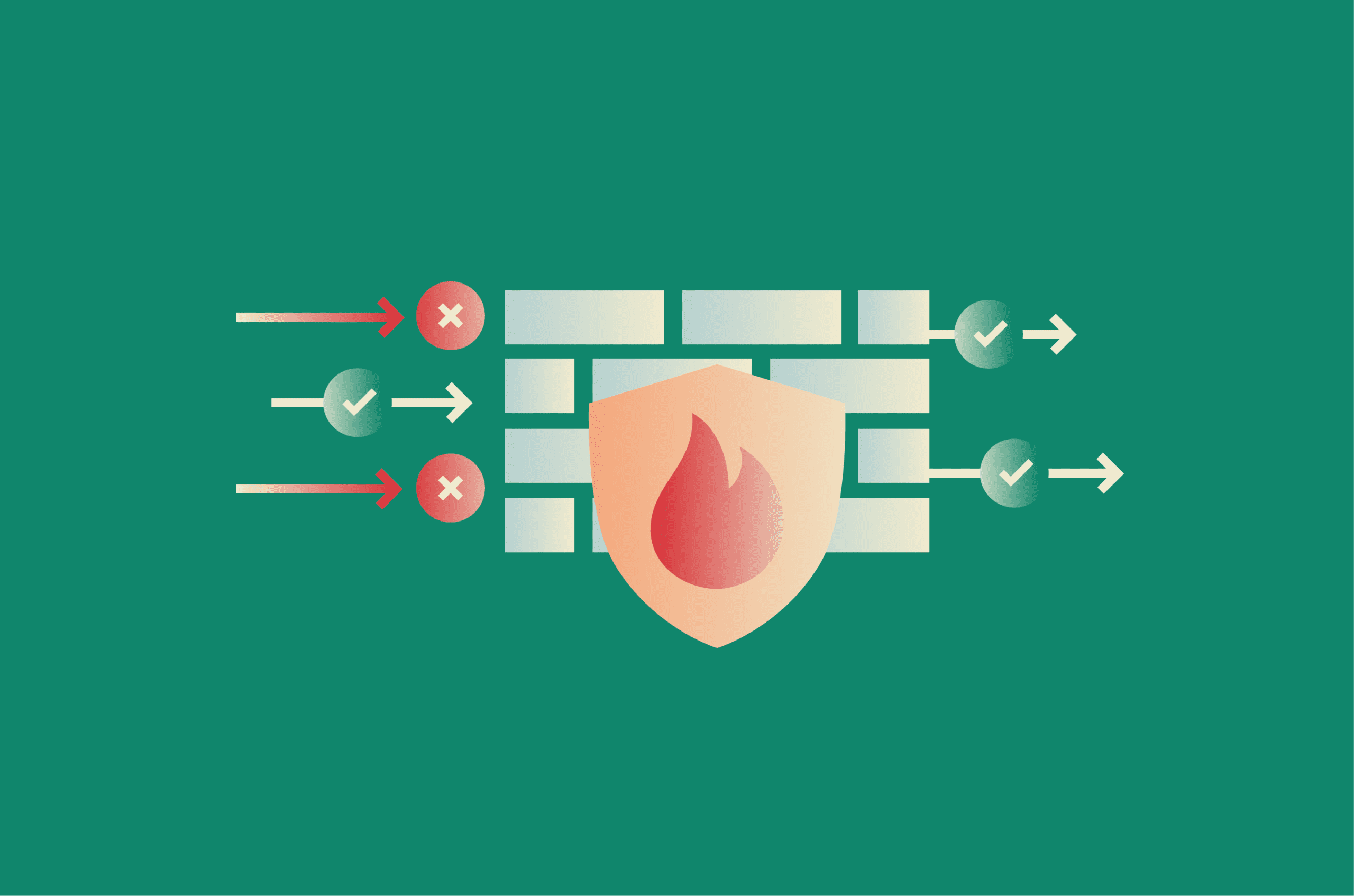
Firewalls have been part of network security since the late 1980s. Since then, networks have expanded from local systems to the public internet, devices have multiplied, and applications now run across cloud services and remote connections.
Despite those changes, firewalls are still used to control which connections are allowed across a network, even as the risks they deal with have evolved.
What is a firewall?
A firewall is a security control that determines which network connections a device or network accepts and which it rejects, based on a defined set of rules. Activities like loading a web page, starting a video call, or syncing an app in the background are checked against those rules before they’re allowed through.
More advanced firewalls extend this by tracking active connections or examining the contents of traffic, not just where it’s coming from and where it’s going.
Firewalls can run as software on a device, as dedicated hardware protecting a network, or as services in the cloud.
How a firewall works
When a device sends or receives data over the internet, that communication is broken into small units called packets. These packets travel separately and are reassembled at the destination.
Each packet includes a header. It contains routing details such as the source IP address (where the traffic comes from) and the destination IP address (where it’s going). It also includes the port (which identifies the service endpoint) and the protocol (the rules that define how the data is transmitted).
A firewall processes this traffic as it passes through. For each packet or connection request, it reads the header and compares it against an ordered set of rules.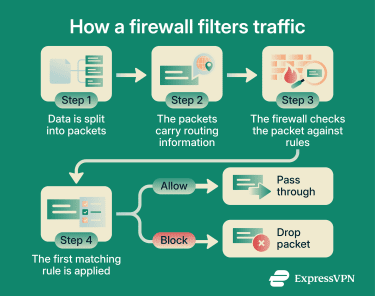
Monitoring incoming and outgoing traffic
Firewalls evaluate traffic continuously. A typical home network handles thousands of packets per second, and this process runs fast enough that it doesn’t affect normal use.
The header gives the firewall enough information to decide whether a connection should be allowed. Based on this, the firewall can block traffic before it reaches the device behind it. A connection that doesn't match any allowed rule is stopped at the firewall instead of reaching the service it was trying to connect to.
How firewalls allow or block connections
Firewall rules define which traffic is permitted. Each rule specifies conditions such as allowed addresses, ports, or protocols, and whether matching traffic should be allowed or blocked.
When traffic arrives, the firewall checks it against the rule set from top to bottom. It applies the first rule that matches and ignores the rest. If the rule allows the traffic, it passes through. If it blocks it, the firewall typically drops the packet without notifying the sender. Some configurations instead send a reset or error message back, but silent drops are the common default on many firewalls.
If no rule matches, the firewall falls back to a default action. In security-focused deployments, that action is usually to deny the traffic, so any connection that hasn't been explicitly permitted is blocked. Other setups, including many consumer routers, take a more permissive approach for outbound traffic and only enforce default-deny on unsolicited inbound connections.
A home router usually allows outbound traffic and blocks unsolicited inbound connections. That means someone on the internet can’t initiate a connection to a device on the network unless a rule allows it. A business firewall may define hundreds of rules that restrict access to specific systems, services, or user groups.
Inbound vs. outbound traffic explained
Firewalls apply different policies depending on traffic direction.
Inbound traffic is data coming from outside the network toward a device. This includes responses to requests the device started, as well as unsolicited attempts to connect. These unsolicited attempts are how many external attacks begin, such as automated scans looking for open ports or repeated login attempts against exposed services.
Blocking them closes off that entry point. Services can still be reached from outside if the network owner allows it through port forwarding or Universal Plug and Play (UPnP), a feature that lets devices open those ports on their own.
Outbound traffic is data leaving a device, such as a browser requesting a web page or an app syncing with a remote service. Most firewalls allow outbound traffic by default. More restrictive setups filter it to prevent compromised systems from connecting to external servers. This can stop malware from sending stolen data or receiving instructions.
Stateful inspection and connection tracking
Most modern firewalls use a technique called stateful inspection, which means they don’t treat each packet in isolation. They maintain a state table. This is a record of active connections, including source and destination addresses and ports.
When a device starts an outbound connection, the firewall records it. When the response returns, the firewall recognizes it as part of that connection and allows it automatically.
This allows normal traffic to flow without interruption while still blocking unsolicited inbound requests. It also helps identify traffic that doesn’t match any valid connection. That kind of traffic often comes from scanning tools or attempts to probe the network for weaknesses.
Types of firewalls
Firewalls come in different forms depending on where they’re deployed and how they inspect traffic. Both affect what they protect and what they can detect.
Hardware, software, and cloud firewalls
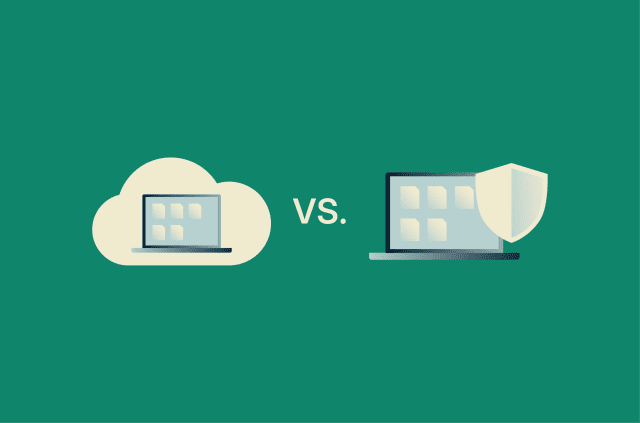
Hardware firewalls are built into physical devices, most commonly routers. A home router filters traffic for every device connected to that network. In business environments, dedicated appliances operate at the network edge and handle larger volumes of traffic.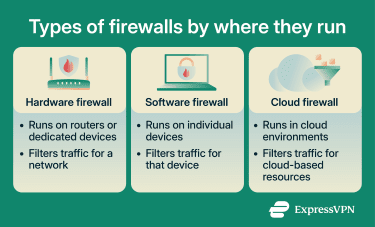
Software firewalls run on individual devices such as laptops or phones. They filter traffic for that device alone. Operating systems like Windows and macOS include one by default.
Cloud firewalls are delivered as a service. They filter traffic for applications and systems running in cloud environments. The same rules can apply whether users connect from an office, a home network, or another location.
Packet filtering and stateful inspection firewalls
Packet filtering is the simplest form of inspection. The firewall reads each packet's header in isolation and makes an allow-or-block decision based on routing details such as the source and destination addresses, the port, and the protocol. It doesn't look at the contents of the traffic itself. Because each packet is evaluated on its own, it can’t determine whether a packet belongs to a legitimate, ongoing connection.
For example, when a device loads a website, it sends a request and then receives the page in response. A packet filter typically can’t verify whether an incoming packet is tied to that request.
Stateful inspection addresses this limitation by tracking active connections. A packet that doesn't match a connection the device actually started is treated as unsolicited and can be blocked. Most home and business firewalls today use stateful inspection by default.
Proxy and next-generation firewalls (NGFW)
For the specific kinds of traffic it's set up to handle, such as web requests or email, a proxy firewall doesn't let the device connect directly to a server. Instead, the device connects to the firewall, and the firewall then creates a separate connection to the destination. It receives the response, inspects the data, and then sends it back to the device.
The original connection ends at the firewall, and a new one starts from it. This lets the firewall examine the full contents of the traffic, not just the routing details on the outside of each packet. The tradeoff is added delay, since each request and response has to be reassembled at the firewall before moving on.
NGFWs combine multiple techniques in a single system. Alongside standard inspection, they add deeper content analysis and application awareness. Application awareness identifies traffic based on the application generating it, not just the port being used. The firewall recognizes patterns in how an application communicates, so it can tell apart traffic that would otherwise look identical from the outside.
Modern applications often send traffic over standard web ports, so it looks like normal browsing. For example, a file-sharing app or a custom service might use the same port as a website. A basic firewall that allows web traffic would treat all of this the same, even though the applications are different.
An NGFW can distinguish between those applications and apply different rules to each one, even when they use the same port.
Web application firewalls (WAF)
A web application firewall (WAF) filters traffic going to a website or application.
When a user loads a page or submits a form, the request is sent using HTTP or its secure version, HTTPS. A WAF intercepts that request on its way to the application. It examines the contents of the request, including fields such as form inputs, URLs, and headers, rather than just where the traffic came from.
The WAF compares this content against a set of rules or known attack patterns. If the request looks normal, it’s passed to the application. If it contains suspicious input, such as text designed to manipulate the application's database queries (a technique known as Structured Query Language (SQL) injection), the WAF blocks it.
This allows it to stop attacks that use valid web traffic formats. A network firewall would allow these requests because they use standard ports and protocols, but a WAF inspects what’s inside the request before deciding.
Where firewalls are used
Firewalls appear at different points across a setup, from individual devices to entire networks and cloud systems.
Home networks and personal devices
Home networks are typically protected at two points: the router and the device itself.
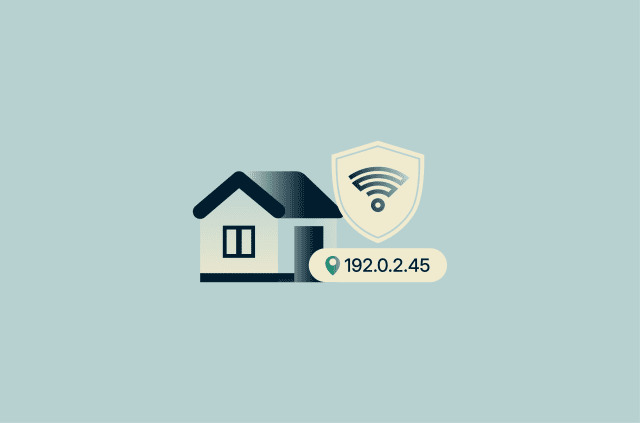
The router handles traffic for every device on the network. Alongside firewall filtering, routers typically use Network Address Translation (NAT), which allows multiple devices in the home to share a single public internet address. From the outside, all traffic appears to come from the router rather than from individual devices. Because of this, external systems can’t directly initiate connections to a specific device unless the router allows it.
Each device also has its own firewall. This becomes especially important when the device connects to a network outside the home, such as a public Wi-Fi network, where the router’s protection no longer applies.
Related: How to secure your home Wi-Fi
Business and enterprise environments
A primary firewall sits at the network edge, where the organization’s internal network connects to the internet, and controls traffic entering and leaving the organization. Larger networks often add internal firewalls or filtering rules to separate different systems, so issues in one area, such as a guest network, don't reach more sensitive systems.
Employee devices also run their own firewalls, which continue to filter traffic when staff work outside the office.
Firewalls in these environments also generate logs. These record allowed and blocked traffic, failed access attempts, and configuration changes. Security teams use this data to detect attacks and identify misconfigurations.
Cloud and remote work setups
In cloud and remote setups, there’s no single network boundary where all traffic passes through.
Applications run on cloud infrastructure, and users connect from different locations. Filtering models vary, but cloud firewalls are often attached to the specific applications and systems they protect, rather than enforced at one central point on the network.
For example, a cloud firewall can control which requests are allowed to reach an application, regardless of where the request originates. The same rules apply whether the user connects from an office network, a home network, or a mobile connection.
Related: What is zero-trust and why it matters in the cloud
Firewall vs. other security tools
Firewalls, antivirus tools, intrusion detection systems (IDS), and virtual private networks (VPNs) play different roles in cybersecurity.
Firewall vs. antivirus
A firewall filters network traffic. Antivirus software scans files, programs, and system activity on the device for malicious behavior.
If someone downloads a malicious email attachment, the firewall usually won't stop the file from arriving if email traffic is allowed. Antivirus then checks the file on the device and looks for signs that it's dangerous.
If malware on the device tries to connect to an attacker's server, antivirus software may detect the malware itself, while the firewall can block the network connection.
Firewall vs. intrusion detection systems (IDS/IPS)
A firewall decides whether traffic should be allowed based on rules such as source, destination, or port. An IDS analyzes network traffic for patterns that suggest an attack and raises an alert. An intrusion prevention system (IPS) performs the same analysis but can also block the traffic automatically.
A firewall may allow encrypted web traffic because it matches an approved rule. In setups where encrypted traffic is decrypted for inspection, IDS or IPS can still inspect that traffic for signs of an exploit, such as a request designed to trigger a software vulnerability.
Many NGFWs include IPS features as part of the same system.
Firewall vs. VPN
A firewall controls which connections are allowed. A VPN encrypts traffic between a device and a VPN server, so anyone monitoring the network in between can't read it.
A VPN also replaces the device's public IP address with the VPN server's address, so websites see the VPN server instead of the device.
A firewall can block unwanted inbound connection attempts or restrict which services a device can reach. A VPN protects traffic in transit, which is especially important on networks the user doesn't control. On public Wi-Fi, the firewall can block unwanted connection attempts from other devices on the same network, and the VPN encrypts traffic in transit, making it much harder for other devices on the same network to read.
Firewall limitations
Firewalls block many threats, but they don’t cover every scenario.
What firewalls cannot protect against
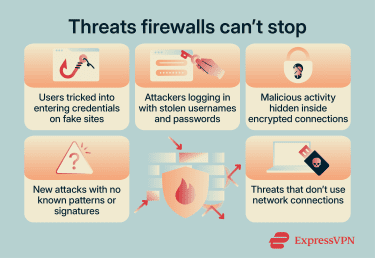
- Phishing and social engineering: A convincing email that tricks someone into entering their password on a fake login page doesn’t involve the firewall. When the user clicks the link, the browser makes a standard web request to load the page, just like it would for any legitimate site, so the firewall may allow it.
- Stolen or misused credentials: If an attacker logs in with a real username and password, the firewall sees an authorized connection. It can’t distinguish between the legitimate user and someone using stolen credentials.
- Encrypted traffic: Most web traffic is encrypted using HTTPS. The firewall can see metadata such as the destination address, the domain being requested, and patterns in how the traffic flows, but not the contents of what's being exchanged. This limits its ability to detect threats hidden inside otherwise allowed traffic. Some firewalls can decrypt and inspect it, but this requires extra setup on each device that's being inspected, adds processing overhead, and means the firewall can read data that would otherwise remain encrypted end-to-end.
- New (zero-day) attacks: Attacks that don’t match known patterns may not be detected immediately, especially in systems that rely on predefined rules or signatures. More advanced firewalls can flag unusual behavior even when there's no specific signature for it. However, detection is still slower and less reliable than for known threats.
- Threats that bypass the network: Malware delivered through a USB drive or a malicious browser extension installed by the user may not pass through the firewall. These threats don't arrive through external network connections.
Common misconfigurations and risks
Misconfiguration is a frequent cause of firewall failures.
- Overly broad rules: Rules that permit traffic from any source to any destination are often created during setup or troubleshooting and left in place longer than intended.
- Outdated rules: As systems change, old rules may remain active and allow traffic to services that are no longer needed or have been reassigned.
- Missed updates: Firewall firmware can have vulnerabilities. Running outdated firmware can turn the firewall into a weak point.
- Unread logs: Firewalls record allowed traffic, blocked attempts, and configuration changes. If these logs aren’t reviewed, those signals go unnoticed.
Best practices for firewall security
These recommendations apply mostly to administrators managing firewalls in a work environment. For home users, the short version is simpler: leave the router firewall on, keep the device firewall on, and install updates when prompted.
Set rules with default deny and least privilege
A default-deny policy blocks all traffic except what has been explicitly allowed. The principle of least privilege limits each rule to only the traffic it requires. Together, they reduce the number of reachable services and restrict how systems can be accessed.
Rules should be specific. Instead of allowing all traffic for a service, limit access by source, destination, and time where possible. Broad rules tend to accumulate exceptions and become harder to control.
Review rules regularly
Over time, rule sets accumulate entries for systems that no longer exist or for temporary changes that were never removed.
Regular reviews identify rules that are no longer needed. Check what each rule allows, why it was created, and whether that need still exists. Rules without a clear purpose or owner are candidates for removal.
Keep firewall software updated
Updates can address vulnerabilities in the firewall itself, add detection for new threats, and fix bugs. The firewall sits between the internal network and the internet, so a flaw in it creates a risk for all the devices that rely on it. That typically makes patching firewall vulnerabilities more urgent than ordinary software updates. Delays can leave known issues unpatched, especially after vulnerabilities are publicly disclosed.
Monitor logs and network activity
Firewalls record allowed and blocked traffic, failed connection attempts, and configuration changes. This helps identify patterns such as repeated access attempts from outside, devices reaching out to unfamiliar addresses, or unusually large data transfers leaving the network.
Alerts on specific events, such as new rule additions or repeated blocks from the same source, allow faster detection and response.
Related: Can your router catch a virus?
FAQ
Does every device have a firewall?
Is a router the same as a firewall?
Can a firewall stop phishing attacks?
Should you keep your firewall on all the time?
Can a firewall slow down your internet?
How can you tell if your firewall is enabled?
Routers vary more. Some show firewall status in the router’s admin interface, but the setting may appear under labels like security, wide area network (WAN), Network Address Translation (NAT), or access control rather than “firewall.” Routers that belong to an internet service provider (ISP) may also expose only limited firewall controls or hide them from users altogether. If you can’t find a clear firewall setting, check your router manual, ISP support page, or router app for security-related options.