What are VPN ports?


When you connect to a virtual private network (VPN), data travels through a secure, encrypted tunnel between the device and the VPN server. At the heart of this connection are VPN ports, acting as gateways through which traffic enters and exits the tunnel.
Different VPN connections rely on different port numbers, and if a network blocks or restricts one of those ports, the VPN can slow down, struggle to connect, or fail completely. This guide explains how VPN ports work, the types of ports that exist, and how to use this information for troubleshooting VPN connection issues.
What is a VPN port?
A VPN port is a numbered network channel that a VPN uses to move its encrypted traffic between your device and the VPN server. Every internet-connected device has up to 65,535 ports, and each port number acts like a label that tells your device which app incoming and outgoing data belongs to. A VPN port is simply one of these ports. Web traffic goes to one port, email to another, and VPN tunnel data goes to the specific port the VPN chooses.
Why are VPN ports important?
A port gives the VPN a dedicated lane for its traffic, so your device always knows where to send and receive the encrypted data that belongs to the tunnel. The specific port a VPN uses also affects how easily that traffic can pass through routers, firewalls, and restricted networks.
Some networks block or throttle certain ports, which can break a VPN connection entirely. Using a commonly allowed port, or switching to a different one, helps the VPN stay stable and reachable even when the network tries to filter it. This is why many VPN apps offer multiple port options: the choice of port changes how well the VPN survives different environments.
Which ports do VPNs use?
VPNs can use many different ports, but the exact port used depends on the VPN protocol running the connection. A VPN protocol is the set of technical rules that defines how the encrypted tunnel is created, how data is formatted, and how it’s transmitted to the VPN server and back.
How protocols use TCP and UDP ports
Every VPN protocol is built to work over one or both of two underlying network transport methods: User Datagram Protocol (UDP), Transmission Control Protocol (TCP), or both. These transport types define how data moves through a connection.
UDP moves data with minimal delay. It sends packets without stopping to confirm every step, which keeps the connection quick and responsive. This approach works well when the network is steady, and the VPN can maintain a smooth, uninterrupted flow.
TCP takes a more structured path. It checks that every packet arrives and arrives in the correct order, correcting any errors along the way. This method keeps the tunnel steady on unreliable or heavily filtered networks, where packets might get lost or scrambled.
Every port on your device is tied to one of these transport types. A port is either a UDP port or a TCP port, not both. Because of this limitation, a VPN protocol can only use ports that match the transport type it’s built to run on.
VPN protocols and their port numbers
OpenVPN and its common ports
OpenVPN is one of the most flexible VPN protocols, and it can operate on both UDP and TCP. Because it supports both transport types, it works with a wide range of ports and can adapt to restrictive networks more easily than many other protocols. Common OpenVPN ports are:
- UDP 1194: The default OpenVPN port in most setups. OpenVPN performs well here because UDP keeps overhead low and lets packets move quickly through the tunnel.
- TCP 1194: Some configurations run OpenVPN over TCP on the same port number. TCP’s built-in error correction helps keep the tunnel stable on unreliable or congested networks.
- TCP 443: This port allows OpenVPN traffic to blend with normal encrypted web requests. Because Hypertext Transfer Protocol Secure (HTTPS) also uses TCP 443, network filters often treat OpenVPN traffic on this port as regular web browsing, making it harder to detect.
- UDP 443: In certain deployments, OpenVPN runs on the UDP version of port 443. This pairs UDP’s faster performance with the advantage of using a commonly allowed port, which helps the tunnel pass through moderate filtering.
- TCP 80: A legacy fallback for very simple filtering setups that’s rarely effective today. HTTP traffic on port 80 is unencrypted and has a very distinct protocol format, making VPN traffic easy to identify.
IKEv2/IPsec port assignments
Unlike protocols that can jump between many ports, Internet Key Exchange version 2 with Internet Protocol Security (IKEv2/IPsec) uses a small, fixed set. That lack of flexibility gives the protocol its strong stability. Because it always knows exactly where its traffic should travel, IKEv2/IPsec keeps the tunnel alive even when the device switches networks, such as moving from Wi-Fi to mobile data. The standard IKEv2/IPsec ports are:
- UDP 500: IKEv2 begins every connection through UDP 500. This port handles the first step of the tunnel setup, where your device and the VPN server authenticate each other and agree on the encryption settings.
- UDP 4500: When your device sits behind a router doing Network Address Translation (NAT), which is almost all home and mobile networks, IKEv2 shifts to UDP 4500. This lets the encrypted packets pass through routers that rewrite packet headers, without breaking the IPSec tunnel.
- Encapsulating Security Payload (ESP): After the handshake, IKEv2/IPsec sends your actual encrypted traffic through ESP. ESP isn’t tied to a numbered port. It's its own IP type (Protocol 50). This is what transports the encrypted packets once the connection is up and running.
WireGuard and its default port
WireGuard is a modern VPN protocol designed to be lightweight and streamlined, and as such, it operates exclusively over UDP. It also uses only one port by default: UDP 51820, giving implementations a predictable, dedicated spot to listen for those lightweight packets while keeping latency low.
Administrators can still assign a different UDP port for WireGuard when they need to work around a filtered or restricted network. What never changes is the transport method: WireGuard always relies on UDP, no matter which port number it operates on.
Lightway and its ports
Lightway is ExpressVPN’s in-house VPN protocol, built to be fast, resilient, and efficient. Unlike many traditional VPN protocols, it isn’t tied to any single port by design, since it doesn’t use a default port and instead runs on randomly assigned ports to reduce detectability. When it runs over TCP, it usually uses port 443, and when it runs over UDP, Lightway typically operates on a random high-numbered UDP port.
How to configure VPN ports
VPNs default to ports depending on the protocol they’re using. However, you can change the VPN port if the protocol allows it. Some consumer VPN apps let you switch ports through settings, while manually configured and corporate VPNs require changes at the configuration or network level.
Changing ports in consumer VPN apps
Most commercial VPN apps handle port selection automatically. Some let you choose the transport type, which could change your port, but VPN apps typically limit the choices to prevent users from breaking the connection.
Changing ports in manually configured VPNs
Manually configured VPNs, such as OpenVPN and WireGuard, handle port assignments inside their configuration files. These files define how the VPN tunnel is established, including the port number and whether the connection uses TCP or UDP. To change the port, the administrator updates the configuration on the server, then ensures all client configurations match it. Once both sides agree on the new port and transport type, the VPN service is restarted so the changes take effect.
Changing ports in a corporate or enterprise VPN
Enterprise VPNs, such as Cisco AnyConnect and Palo Alto GlobalProtect, handle port settings at the gateway level rather than inside a local app. Administrators apply port and protocol changes directly on the VPN server or appliance, and those settings are then delivered to every connected device.
Because these platforms use centralized management and strict security policies, the ability to change ports is usually limited to authorized administrators and may be restricted by organizational requirements.
Security implications of VPN ports
VPN ports play a role in how encrypted traffic moves across a network, but the port itself doesn’t determine the security of the connection. A VPN port isn’t inherently safe or unsafe. What matters is what protocol is listening on that port and how exposed that port is to the internet.
Identifying vulnerable VPN ports
To evaluate whether a VPN port is vulnerable, look at the following factors:
Use of weak or deprecated VPN protocols
A port becomes unsafe when it accepts traffic from outdated or flawed VPN protocols. These protocols weaken security because the encryption, authentication, or key-exchange mechanisms behind them can be broken or bypassed. For example, Point-to-Point Tunneling Protocol (PPTP) relies on Microsoft Challenge-Handshake Authentication Protocol version 2 (MS-CHAPv2), which can be cracked in hours, and Layer 2 Tunneling Protocol (L2TP) without IPsec provides no encryption at all. If a port is listening for one of these insecure tunneling methods, the port becomes an easy target, no matter which number it uses.
Unrestricted exposure to the public internet
A VPN port becomes vulnerable when it is reachable from anywhere on the internet with no restrictions. This doesn’t automatically make the port insecure, but it greatly expands the attack surface. A publicly reachable port must rely entirely on the strength of the VPN protocol and its authentication methods because anyone, including automated scanners, can interact with it.
Lack of firewall filtering and access controls
Even if a VPN port is publicly reachable, proper firewall rules can limit who is allowed to communicate with it. A VPN port becomes significantly safer when firewall rules restrict access to approved IP ranges, trusted networks, or rate-limited traffic. Without these controls, the port becomes a much more attractive target.
Predictable port discovery
One method attackers use is scanning the internet for ports that commonly host VPN services, such as 500, 4500, 1194, and 443. The port itself isn’t dangerous, but its predictability makes it easier for attackers to map the VPN service and target it directly.
Best practices for securing VPN ports
Securing VPN traffic on a network involves using protocols that maintain strong encryption. That ensures that the ports associated with those VPN protocols are allowed through the local firewall or router. The following practices help ensure that any open VPN port remains hardened against scanning, probing, and exploitation: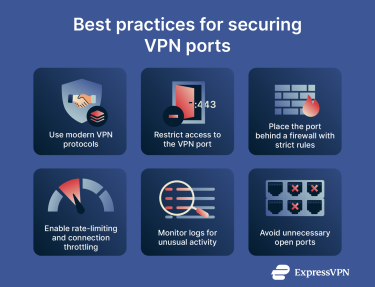
- Use modern VPN protocols only: Stick to OpenVPN, WireGuard, IKEv2/IPsec, or ExpressVPN’s proprietary Lightway protocol. Avoid outdated tunneling methods like PPTP or L2TP without IPsec, since their weak cryptography makes any port they run on vulnerable.
- Restrict who can reach the VPN port: Limit access to known IP ranges, corporate networks, or a zero-trust gateway.
- Place the port behind a firewall with strict rules: Allow only the transport type (TCP or UDP) and the port number the VPN needs.
- Enable rate-limiting and connection throttling: Slow down repeated failed connection attempts to reduce the impact of brute-force attacks and automated scanning.
- Monitor logs for unusual activity: Watch for repeated failed connection attempts, port scans, or unexpected traffic spikes. These often indicate probing of the VPN entry point.
- Avoid unnecessary open ports: Disable alternative VPN ports you aren’t actively using. Each open port increases the Internet-facing attack surface.
VPN port forwarding: Use cases and risks
VPN port forwarding is a feature that lets outside traffic reach a device behind a VPN connection. Normally, a VPN hides your real IP address and blocks unsolicited inbound connections. Port forwarding creates a controlled exception by opening a specific port on the VPN server and sending that incoming traffic to your device through the encrypted tunnel.
This is useful if you have a device or service behind the router that needs to accept external connections, such as game servers, remote-access tools, or applications that rely on peer-to-peer (P2P) traffic.
However, because of the security and privacy risks of exposing your traffic or device to the internet, ExpressVPN doesn’t support port forwarding on its VPN servers. Its custom router firmware includes a port-forwarding option, but you should know that forwarded ports are outside the VPN tunnel, which means they’re not encrypted or protected by the VPN connection.
When and why use it
Port forwarding is useful when you need someone, or something, to reach your device directly. Common situations include:
- Running a home server: Lets external devices reach a personal web service, calendar server, or self-hosted cloud that normally wouldn’t be reachable through a VPN tunnel.
- Hosting a game server: Allows other players to initiate a direct inbound connection to your device so they can join private multiplayer sessions.
- Accessing a media library remotely: Enables apps like Plex or Jellyfin to accept incoming requests from outside the home network and stream content.
- Supporting remote access tools: Some remote desktop and management systems need a specific inbound port, and forwarding it ensures the connection can reach the device even while the VPN is active.
- Maintaining a developer/test environment: Developers running local test servers can expose a port so teammates, CI tools, or external devices can connect reliably from outside the network.
- P2P performance: Certain P2P services work better when they can accept inbound connections, improving speed and connection stability.
- Smart home or Internet of Things (IoT) access: Some smart devices require inbound communication for remote control or monitoring, and forwarding a port makes remote access possible through a VPN.
Security concerns with port forwarding
Port forwarding changes how visible the device becomes to external networks. Because of this, it must be approached with a clear understanding of the associated risks. Key considerations include:
- Greater exposure to external scanning: Forwarded ports can appear in internet-wide scans performed by automated tools. These scans look for open ports and may attempt to identify which service is running behind them.
- Service-level vulnerabilities: The forwarded application becomes responsible for its own security. If the software has known flaws or isn’t regularly updated, the exposure increases the likelihood that those weaknesses could be exploited.
- Reduced isolation behind the router: Devices behind a standard VPN router are typically shielded from unsolicited inbound traffic. Forwarding a port reduces the isolation for the selected device, making it reachable from outside the network.
- Dependence on proper configuration: A misconfigured service may unintentionally allow broader access than intended. Even minor configuration errors on the forwarding device can affect how the service responds to inbound requests.
FAQ: Common questions about VPN ports
Is OpenVPN port 443 or 1194?
OpenVPN can use both. User Datagram Protocol (UDP) port 1194 is the default for most configurations, while Transmission Control Protocol (TCP) port 443 is used when the connection needs to blend with standard HTTPS traffic on restrictive networks.
What are ports 5000 and 4500 used for in VPNs?
User Datagram Protocol (UDP) port 4500 is used by Internet Key Exchange version 2 with Internet Protocol Security (IKEv2/IPsec) when Network Address Translation (NAT) is present, allowing the protocol to traverse routers and firewalls. Port 5000 is not a standard VPN port. It’s typically assigned to Universal Plug and Play (UPnP) services on routers, along with port 1900. In a VPN context, it only becomes relevant when you’re hosting a VPN server behind such a router: UPnP (using port 5000) can automatically create the port-forwarding rules for your actual VPN ports (for example, 1194, 500, or 4500).
Are ports 25, 143, or 53 used for VPNs?
No, those ports belong to other services such as Simple Mail Transfer Protocol (SMTP), Internet Messaging Access Protocol (IMAP), and Domain Name System (DNS) queries. Modern VPN protocols do not use them for encrypted tunnel traffic.
How do I choose a VPN service based on ports?
Most VPN services manage ports automatically and don’t require users to make selections. The underlying protocol, such as OpenVPN or IKEv2/IPsec, determines which ports are used. Manual port selection is typically relevant only for advanced router or server setups.
What is the safest port for VPN use?
Safety depends on the VPN protocol, not the port. OpenVPN, IKEv2/IPsec, and WireGuard provide the same level of encryption regardless of what port they use. The only real difference a port number makes is how easily a VPN server shows up during scans.
Default VPN ports like 51820 (WireGuard) or 1194 (OpenVPN) are included in most automated scanning tools and are frequently probed across the internet. If your VPN is running on one of those, it’s more likely to receive unwanted connection attempts. Using a random, high-numbered port that isn’t tied to a well-known service makes it less likely to be scanned.
Can I change VPN ports manually?
Some advanced configurations allow manual port changes, typically through OpenVPN profiles, Linux setups, or VPN-supported routers. The VPN server must support the selected port, and not all VPN apps offer this option.
Why do some public Wi-Fi networks block VPNs at the port level?
Some public or managed networks filter traffic associated with common VPN ports to limit encrypted connections and enforce local access policies. Blocking specific User Datagram Protocol (UDP) or Transmission Control Protocol (TCP) ports can prevent certain VPN protocols from establishing a tunnel.
How do I check which VPN port I’m using?
Most VPN applications handle port selection automatically and don’t display the active port. Advanced setups, such as OpenVPN configuration files or router logs, may show the port in use. On standard VPN consumer apps, the port is selected internally by the VPN protocol, and it’s not shown to the user.
Take the first step to protect yourself online. Try ExpressVPN risk-free.
Get ExpressVPN