What is 3-D Secure? Understanding online payment security


Whenever you pay for something online, your card details travel through various systems before a payment is confirmed. Most of that process is invisible to you, but one layer you may have noticed is an extra verification step your bank sometimes requests before approving a transaction. That step is a key part of the 3-D Secure (3DS) authentication process.
While 3DS usually works silently in the background, it will occasionally ask you to confirm a payment by entering a one-time code, approving it in your banking app, or verifying your identity with biometrics. This article explains exactly what 3-D Secure is, how it works, why it sometimes fails, and how to stay safe while using it.
What is 3-D Secure?
3-D Secure (also spelled as 3D Secure and abbreviated as 3DS) is a security protocol built to secure online payments made via credit and debit cards. It was first launched commercially by Visa under the Verified by Visa name, though Visa’s version is now known as Visa Secure.
Although Visa was the first to introduce the protocol commercially, it has since been adopted by other payment networks, each offering it under their own branded implementation: Mastercard Identity Check (formerly SecureCode), American Express SafeKey, Discover ProtectBuy, and JCB J/Secure. The protocol is now standardized and maintained by EMVCo, a consortium owned by the major card networks.
Who uses 3-D Secure?
3DS is used by everyone involved in an online card transaction. Merchants implement it at checkout to reduce fraud and shift chargeback liability, card issuers use it to verify identity before approving a payment, and cardholders interact with it directly when confirming a purchase via one-time passcodes (OTP) or banking app.
All of this is tied together by the card networks, which maintain the infrastructure that makes the process possible.
Key components of the 3-D Secure system
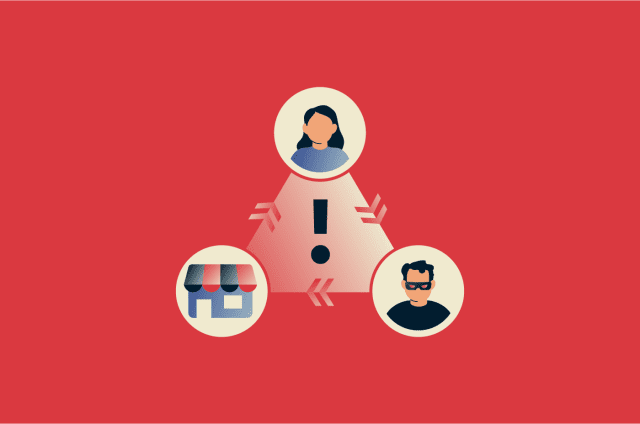
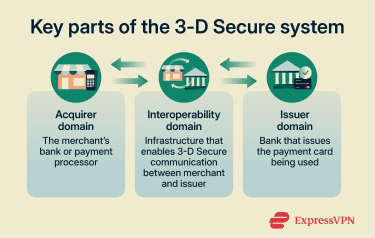
The name 3DS comes from the three domains involved in each transaction:
- Merchant/acquirer domain: Includes the merchant, the acquirer (the financial institution or payment provider that processes card payments for the merchant), and any gateway or processor involved on the merchant side of the transaction.
- Issuer domain: Includes the card issuer and its authentication systems, which verify the cardholder during the 3DS process.
- Interoperability domain: The card-network infrastructure that connects the other two domains and routes 3DS messages, such as via the Directory Server.
How 3-D Secure works
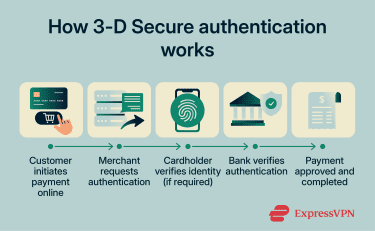
3DS works almost entirely behind the scenes, typically completing in milliseconds if no user intervention is needed:
- Transaction initiated: A customer uses their card through the merchant’s payment gateway. The gateway forwards the transaction details to the card network, which begins the 3DS authentication process with the card issuer.
- Authentication requested: The merchant server issues a request for the card issuer to authenticate the cardholder. If the transaction is deemed low-risk, the authentication happens automatically and silently in the background. If not, the cardholder is usually prompted to verify themselves with an embedded frame or banking app notification.
- Authentication provided: The cardholder provides authentication by entering the required details.
- Transaction authenticated: The card issuer verifies the authentication information given by the customer.
- Transaction completed: The transaction is authenticated, and the customer is redirected back to the merchant's page once the transaction succeeds.
3-D Secure 1 vs. 3-D Secure 2
3DS2, published in 2016, is the successor to 3DS1 and introduces major changes to the protocol. It uses different message structures and supports richer data exchange, app-based flows, and frictionless authentication, so it is not a drop-in upgrade from 3DS1.
Key differences in authentication and user experience
3DS1 often added friction to checkout because it was browser-dependent and commonly required extra cardholder verification, such as a password, security question, or one-time code. Because of this, it was widely criticized for hurting conversion.
By contrast, 3DS2 is designed to reduce friction through risk-based authentication and frictionless flows, allowing many low-risk transactions to be authenticated in the background with no extra step for the customer.
Improvements for mobile and app-based payments
3DS1 was built around browser-based authentication flows, which often created a clunky experience on mobile. By contrast, 3DS2 was designed to support both browser and native app environments, including app-based authentication through a 3DS SDK.
In 3DS2, issuers can authenticate transactions using methods such as one-time passcodes, banking-app approval, or biometrics like fingerprint or facial recognition. The challenge flow can also be embedded more smoothly within web and mobile checkouts, reducing reliance on disruptive redirects, though some fallback cases may still open a browser.
What data may be used in 3DS2 verification
3DS2 can collect and analyze over 100 data points to assess transaction risk. This data includes device ID, previous transactions, device location, operating system, and more. All of this information is encrypted in transit and only accessible to parties involved in the transaction. The more data is sent, the better equipped your bank is to make an accurate risk decision.
Mastercard even highlights that this can reduce friction significantly by making it so that 90% of transactions don’t require a manual challenge to authenticate the user.
Role of 3DS2 in Strong Customer Authentication (SCA)
Strong Customer Authentication (SCA) requirements were introduced under Europe's revised Payment Services Directive 2 (PSD2). SCA is mandatory for all online customer-initiated transactions within the European Economic Area (EEA) and the U.K.
SCA requires payment service providers to authenticate electronic payments using at least two independent factors from the categories of knowledge (something the user knows), possession (something the user possesses), and inherence (something the user is).
3DS2 is one of the key authentication methods businesses use to comply with SCA requirements. This is primarily because 3DS2 enables merchants to transmit multiple data points related to the transaction and the customer’s device or activity. By analyzing this additional information, issuers can better determine whether further authentication is required and can request authentication to satisfy the requirements defined by SCA.
Frictionless vs. challenge authentication
The 3DS protocol offers card users two ways to verify themselves: frictionless and challenge.
The frictionless authentication flow was introduced with 3DS 2, in which the issuer does risk-based authentication to approve a transaction without requiring any manual input from the cardholder.
This risk-based authentication involves considering various elements to determine whether manual verification is needed, including the transaction’s value, the user’s transaction history, and the device being used. If the system doesn’t flag a concern, manual verification isn’t needed, and the purchase is completed without the user even knowing a check happened.
In contrast, challenge-based authentication is what has been available since the initial implementation of the 3DS protocol. As the name suggests, this requires the user to authenticate themselves manually via a challenge. This could include entering an OTP, biometrics, or other sensitive information that only the user has access to.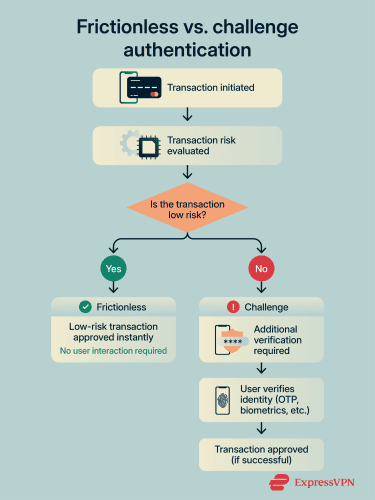
Of course, even with the modern 3DS 2 implementation, there are still cases where manual challenge-based authentication is required. Examples include when a transaction exceeds a certain amount of money or when a merchant manually enforces it.
How 3-D Secure helps protect online payments
3DS serves both cardholders who want to keep their card from being misused and merchants who want protection from fraudulent chargebacks.
How it reduces fraud risk for cardholders
The core protection 3DS offers cardholders is that a stolen card number alone is usually no longer enough to complete a significant purchase on a 3DS-enabled site. Even if a criminal gets your card details through methods like skimming, they’re highly unlikely to also have access to your phone, banking app, or biometric data to pass 3DS verification.
Benefits for merchants and chargeback protection
For merchants, the main benefit of 3DS is fraud-related chargeback protection through liability shift. Generally, when a transaction is successfully authenticated and processed correctly, liability for certain fraud-related disputes shifts from the merchant to the issuer, though the exact rules can vary by card network and region.
Limits of 3-D Secure in fraud prevention
Despite being a strong transaction security tool, even 3DS has its limits. Cybercriminals can bypass authentication through social engineering, where attackers impersonate bank representatives and convince victims to reveal verification codes sent during the 3DS process.
Another limitation arises from transaction exemptions and merchant implementation choices. Some merchants disable 3DS for smaller purchases to reduce checkout friction, allowing cybercriminals using stolen card details to make multiple transactions below the authentication threshold.
Why 3-D Secure payments may fail
3DS payments can fail for a variety of reasons, ranging from user errors to technical problems on the bank’s end.
Incorrect verification details or expired codes
Among the simplest explanations for a failed 3DS authentication is the user accidentally entering an incorrect OTP during verification. 3DS transactions can also fail due to expired OTPs. These codes have a short window of validity, meaning a transaction can fall through if the code has expired by the time the user enters it. In this case, it’s usually easy to request a new code to continue with the transaction.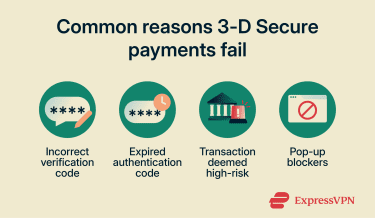
Issuer security checks and transaction limits
Card issuers may flag a transaction for reasons beyond incorrect details. If the data collected during 3DS authentication indicates that a transaction is high-risk, it could lead to an automatic decline. This could be due to an unusually large payment, an international transaction, or a card simply not being enrolled in 3DS.
Payments can also be declined if users attempt to pay an amount exceeding the transaction limit on their card. An excessive number of failed transactions can also lead to temporary blocks that prevent a card from performing 3DS authentication. Currently, PSD2 regulations require a temporary block after five consecutive failed authentication attempts.
Technical issues with browsers, apps, or networks
Simple technical issues can also lead to a 3DS transaction being declined. Pop-up blockers are a well-known culprit for this, as they can prevent the 3DS authentication redirect from loading. Using outdated browsers or devices could also cause a 3DS transaction to fail, as some of them don’t support the newer 3DS2 protocol and are unable to load the authentication screen.
How cardholders interact with 3-D Secure
Cardholders interact with 3DS regularly, although they may not know it by name.
How enrollment typically works with card issuers
The card-issuing bank is usually responsible for enrolling a customer into the 3DS platform. However, enrollment in 3DS varies by region. Some have a mandatory requirement, meaning it’s enabled by default, while some make it optional and let users choose to opt in.
In the U.S., for instance, 3DS enrollment is opt-in, and cards usually aren’t enrolled unless users explicitly request to opt into the protocol. On the other hand, all cards in the U.K. and EU regions are 3DS-enrolled by default to ensure compliance with regulatory requirements like SCA. In India, regulators require additional authentication for many online card-not-present transactions, but not specifically under the 3DS name. In South Africa, 3DS has been mandated for local merchants through the Payment Association of South Africa (PASA).
What happens during authentication prompts
When you reach a 3DS checkout, and the system decides a challenge is needed, you’ll typically see one of the following authentication prompts:
- A one-time passcode sent to your registered phone number by SMS.
- A push notification in your banking app asking to approve the payment.
- A biometric verification request through your bank's app.
When the checkout determines a challenge is needed, it sends a request to your bank, which pushes the verification prompt to your registered device. The challenge appears either as an embedded screen within the checkout flow or as a redirect to the bank's authentication page. After passing the authentication, you’re returned to the merchant's confirmation page, and the transaction proceeds.
What to do if you can’t complete verification
The following steps can help resolve any issues if you’re unable to complete 3DS verification after multiple attempts:
- Check if details are correct: Make sure you're entering the right information during 3DS authentication, including any OTP requested.
- Disable pop-up blockers and browser extensions: These can interfere with the authentication flow and prevent the verification screen from loading properly.
- Contact your bank: If the problem persists, reach out to your card issuer to check whether your account has any restrictions or isn't properly enrolled in 3DS.
- Try a different payment method: As a last resort, you can pay using a method that doesn't require 3DS. Bear in mind, though, this may affect the fraud liability protections that come with 3DS-verified transactions.
Security tips for using 3-D Secure
3DS adds a meaningful layer of protection to online payments, but it still has its limitations, and you should still be vigilant when using it.
How to recognize legitimate authentication prompts
Cybercriminals can create fake 3DS verification pages to trick users, which is why it’s critical to know what a legitimate prompt looks like. The first thing to remember is that a genuine 3DS prompt will always be tied to a specific transaction you recently initiated. You’ll never receive a random unsolicited 3DS verification request when you aren’t actively attempting to use your card.
It’s also important to remember that a legitimate 3DS verification request will usually only ask for a single thing, such as biometrics or an OTP. If you’re asked to enter any other details like your full card number or online banking password, the request is likely a scam.
Avoiding phishing and fake verification pages
As mentioned earlier, attackers can use social engineering to trick victims into providing 3DS verification details, such as their OTP. There are also instances in which these cybercriminals create fake versions of legitimate shopping websites. When a user enters their 3DS credentials, the hackers steal them and use them to complete purchases on the legitimate site.
Our guide on avoiding phishing scams covers the various phishing methods in detail and highlights techniques you can follow to secure yourself against them.
What to do if you suspect payment fraud
Fraudulent transactions can occur even with safeguards like 3DS in place. If you see a charge on your account that you didn’t authorize, it’s important to act quickly. Contact your bank immediately to report the transaction and request a block on your card. Banks generally have a process for investigating fraudulent charges and determining refund eligibility.
You can also file complaints with agencies like the Federal Trade Commission (FTC) in the U.S., or your country’s equivalent. These organizations can provide guidance, and the information you give can help with tracking fraud trends. Note, however, that they don’t directly resolve individual cases.
After reporting the fraud, it’s worthwhile to monitor your bank statements closely to spot any subsequent fraudulent transactions and report them as needed. You could also consider using identity theft monitoring tools like ExpressVPN’s Identity Defender, which can help detect suspicious activity early and provide alerts if your personal information is being misused. Identity Defender is available to U.S. users of ExpressVPN on the Advanced and Pro plans.
FAQ: Common questions about 3-D Secure
How do I know if my card uses 3-D Secure?
What happens if a 3-D Secure verification fails?
Why didn’t I receive a verification code?
Can 3-D Secure payments be used internationally?
Does 3-D Secure guarantee fraud protection?
Take the first step to protect yourself online. Try ExpressVPN risk-free.
Get ExpressVPN