
Expressvpn Glossary
Database replication
What is database replication?
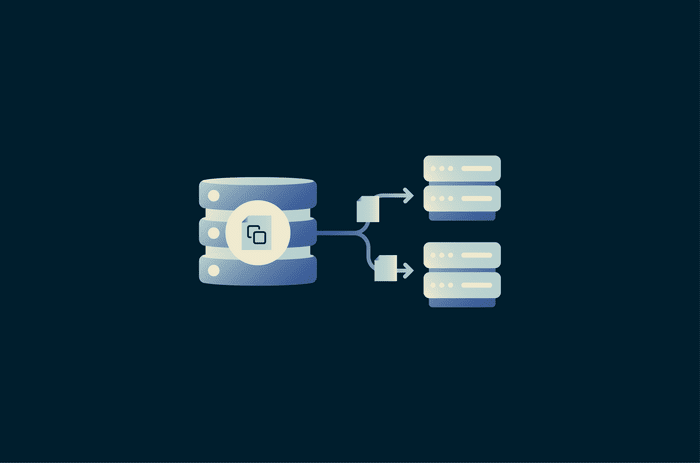
Database replication is the process of copying data from one database to one or more other servers, making the same data available in multiple places. In many deployments, a primary database usually handles writes and updates, while replica databases receive those changes to stay synchronized. This can improve availability, support failover and disaster recovery, and reduce load by spreading read traffic across multiple servers. However, replication is not the same as a backup, because unwanted changes can also be replicated.
How does database replication work?
Database replication often begins by creating an initial copy of a database on another server, so both systems start with the same data and structure. After that, many database systems track committed changes in a transaction or redo log, rather than sending the full database again. Those changes may include inserts, updates, deletes, and, in some systems or replication modes, certain schema changes.
A replication process reads the recorded changes, sends them to the replica, and the replica applies them to stay closely aligned with the primary. This uses less bandwidth and processing than repeated full copies, though replicas may still lag behind the primary in asynchronous setups.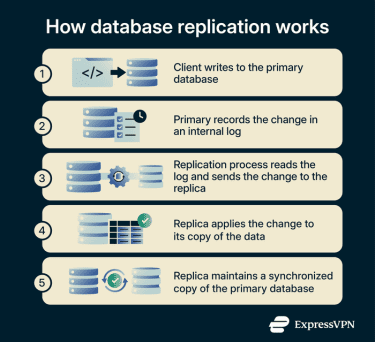
Types of database replication
- Synchronous vs. asynchronous replication: In synchronous replication, a transaction is not fully committed until the required replicas also confirm it. In asynchronous replication, the primary commits first and replicas catch up afterward. This can reduce write delay, but recent changes may be lost if the primary fails before replication finishes.
- Physical vs. logical replication: Physical replication copies database storage or redo changes at a low level, often at the block level. Logical replication copies higher-level data changes, such as insert, update, and delete operations.
- Primary‑replica vs. multi‑primary: In primary-replica replication, one primary server accepts writes, and replicas replicate its changes. In multi-primary replication, multiple nodes can accept writes, which requires coordination and conflict handling.
- Snapshot vs. continuous replication: Snapshot replication copies the full dataset at one point in time. In some database systems, snapshots are also used to initialize other types of replication. Continuous replication sends ongoing changes after the initial copy, so replicas stay up to date.
- Geo‑replication across regions: Geo-replication stores replicated data in different zones or regions. This improves resilience and can support data residency or compliance requirements, depending on how the deployment is configured.
Why is database replication important?
Database replication is important because it improves availability and resilience. If the primary database fails, a replica can take over, reducing downtime, depending on the failover setup. Replication can also distribute read traffic across multiple servers, reducing the load on the primary server.
It also supports disaster recovery and planned maintenance. Replicated copies can help restore service after failures and, in some environments, allow teams to perform updates or maintenance with less disruption. This helps organizations meet availability and continuity requirements. However, replication is not the same as a backup or point-in-time recovery strategy.
Where is database replication used?
Database replication is used in systems that need higher availability, better read performance, or data in multiple locations. Common examples include high-traffic web services, financial systems, global applications, and analytics environments.
It is often used to distribute read traffic, keep standby systems ready for failover, and separate reporting workloads from live production databases. It also supports applications that require data to be closer to users across different regions.
Risks and privacy concerns
Replication lag can cause stale reads, where a replica returns older data than the primary. Replication can also copy problems, including corruption, malicious or unwanted changes, or security misconfigurations, from the primary system.
Replication traffic should be encrypted to reduce the risk of data being intercepted between nodes. Cross-region replication can also create compliance risks when data is stored or transferred across jurisdictions with different legal or regulatory requirements.
Further reading
- What is a cross-connect in a data center?
- What is a virtual private cloud (VPC)?
- Data sovereignty: What it is and compliance considerations
- What is network-attached storage (NAS)?
- Network File System (NFS): A secure guide for remote access